<?xml version="1.0" encoding="utf-8"?><feed xmlns="http://www.w3.org/2005/Atom" ><generator uri="https://jekyllrb.com/" version="4.3.1">Jekyll</generator><link href="https://natesubra.github.io/feed.xml" rel="self" type="application/atom+xml" /><link href="https://natesubra.github.io/" rel="alternate" type="text/html" /><updated>2023-11-16T17:07:34+00:00</updated><id>https://natesubra.github.io/feed.xml</id><title type="html">natesubra</title><subtitle>A blog by Nate Subra
</subtitle><author><name>Nate Subra</name></author><entry><title type="html">Scanning custom UDP protocols with masscan</title><link href="https://natesubra.github.io/til/2023/11/16/scan-custom-udp-protocol-masscan.html" rel="alternate" type="text/html" title="Scanning custom UDP protocols with masscan" /><published>2023-11-16T00:00:00+00:00</published><updated>2023-11-16T00:00:00+00:00</updated><id>https://natesubra.github.io/til/2023/11/16/scan-custom-udp-protocol-masscan</id><content type="html" xml:base="https://natesubra.github.io/til/2023/11/16/scan-custom-udp-protocol-masscan.html"><![CDATA[<div class="paragraph">
<p>One of my security researcher acquaintances (hi Reid!) was working on an interesting problem set the other day.</p>
</div>
<div class="paragraph">
<p>The goal was to identify hosts on the internet running a custom UDP protocol. The problem was custom scanning at scale is kind of a pain. You&#8217;re looking at writing a decent amount of C to scan for what is often a one off.</p>
</div>
<div class="paragraph">
<p>Reid discovered that Nmap has a <a href="https://nmap.org/book/nmap-payloads.html">feature</a> that allows you to specify a custom UDP payload to send to a host:</p>
</div>
<div class="paragraph">
<p>This is great, but Nmap is single threaded and not the fastest scanner out there (by design). We want to scan at scale, so we need something faster.</p>
</div>
<div class="paragraph">
<p>Well, masscan supports many Nmap (via libpcap), and checking the masscan man file we find <a href="https://github.com/robertdavidgraham/masscan/blob/2a547f72cee47f8a47d367c7ef43051455401e3e/doc/masscan.8.markdown?plain=1#L124">this</a> gem:</p>
</div>
<div class="listingblock">
<div class="content">
<pre class="rouge highlight"><code data-lang="man"><table class="linenotable"><tbody><tr><td class="linenos gl"><pre class="lineno">1
2
3
4
</pre></td><td class="code"><pre>  * `--nmap-payloads FILE`: read in a file in the same format as
    the nmap file `nmap-payloads`. This contains UDP payload, so that we
	can send useful UDP packets instead of empty ones. Similar to
	`--pcap-payloads`.
</pre></td></tr></tbody></table></code></pre>
</div>
</div>
<div class="paragraph">
<p>So, we can use masscan to scan for custom UDP protocols by creating an nmap-payloads file with our port/payload and then pass that file to masscan.</p>
</div>
<div class="paragraph">
<p>Lets create a new nmap payload file with the following contents:</p>
</div>
<div class="listingblock">
<div class="title">my-payload-file.txt</div>
<div class="content">
<pre class="rouge highlight"><code data-lang="text"><table class="linenotable"><tbody><tr><td class="linenos gl"><pre class="lineno">1
2
3
</pre></td><td class="code"><pre># we've been trying to reach you about your cars extended warranty
udp 1234
    "\x77\x65\x27\x76\x65\x20\x62\x65\x65\x6e\x20\x74\x72\x79\x69\x6e\x67\x20\x74\x6f\x20\x72\x65\x61\x63\x68\x20\x79\x6f\x75\x20\x61\x62\x6f\x75\x74\x20\x79\x6f\x75\x72\x20\x63\x61\x72\x73\x20\x65\x78\x74\x65\x6e\x64\x65\x64\x20\x77\x61\x72\x72\x61\x6e\x74\x79"
</pre></td></tr></tbody></table></code></pre>
</div>
</div>
<div class="paragraph">
<p>and then leverage masscan to send that payload when scanning:</p>
</div>
<div class="listingblock">
<div class="content">
<pre class="rouge highlight"><code data-lang="sh"><table class="linenotable"><tbody><tr><td class="linenos gl"><pre class="lineno">1
</pre></td><td class="code"><pre>masscan &lt;target_range&gt; <span class="nt">--nmap-payloads</span> my-payload-file.txt <span class="nt">-p</span> U:1234
</pre></td></tr></tbody></table></code></pre>
</div>
</div>
<div class="paragraph">
<p>Masscan also has the option to parse a pcap and utilize responses from that when scanning. Save some typing and potentially some fat fingers.</p>
</div>
<div class="listingblock">
<div class="content">
<pre class="rouge highlight"><code data-lang="text"><table class="linenotable"><tbody><tr><td class="linenos gl"><pre class="lineno">1
2
3
4
5
</pre></td><td class="code"><pre>  * `--pcap-payloads FILE`: read packets from a libpcap file containing packets
    and extract the UDP payloads, and associate those payloads with the
	destination port. These payloads will then be used when sending UDP
	packets with the matching destination port. Only one payload will
	be remembered per port. Similar to `--nmap-payloads`.
</pre></td></tr></tbody></table></code></pre>
</div>
</div>
<div class="admonitionblock note">
<table>
<tr>
<td class="icon">
<i class="fa icon-note" title="Note"></i>
</td>
<td class="content">
These are documented in the man page, but not in the help <code>masscan -h</code> output, always check your man pages and source code to know the true capabilities of your tools
</td>
</tr>
</table>
</div>]]></content><author><name>Nate Subra</name></author><category term="TIL" /><category term="TIL" /><category term="methodology" /><category term="workflow" /><category term="scanning" /><summary type="html"><![CDATA[One of my security researcher acquaintances (hi Reid!) was working on an interesting problem set the other day. The goal was to identify hosts on the internet running a custom UDP protocol. The problem was custom scanning at scale is kind of a pain. You&#8217;re looking at writing a decent amount of C to scan for what is often a one off. Reid discovered that Nmap has a feature that allows you to specify a custom UDP payload to send to a host: This is great, but Nmap is single threaded and not the fastest scanner out there (by design). We want to scan at scale, so we need something faster. Well, masscan supports many Nmap (via libpcap), and checking the masscan man file we find this gem: 1 2 3 4 * `--nmap-payloads FILE`: read in a file in the same format as the nmap file `nmap-payloads`. This contains UDP payload, so that we can send useful UDP packets instead of empty ones. Similar to `--pcap-payloads`. So, we can use masscan to scan for custom UDP protocols by creating an nmap-payloads file with our port/payload and then pass that file to masscan. Lets create a new nmap payload file with the following contents: my-payload-file.txt 1 2 3 # we've been trying to reach you about your cars extended warranty udp 1234 "\x77\x65\x27\x76\x65\x20\x62\x65\x65\x6e\x20\x74\x72\x79\x69\x6e\x67\x20\x74\x6f\x20\x72\x65\x61\x63\x68\x20\x79\x6f\x75\x20\x61\x62\x6f\x75\x74\x20\x79\x6f\x75\x72\x20\x63\x61\x72\x73\x20\x65\x78\x74\x65\x6e\x64\x65\x64\x20\x77\x61\x72\x72\x61\x6e\x74\x79" and then leverage masscan to send that payload when scanning: 1 masscan &lt;target_range&gt; --nmap-payloads my-payload-file.txt -p U:1234 Masscan also has the option to parse a pcap and utilize responses from that when scanning. Save some typing and potentially some fat fingers. 1 2 3 4 5 * `--pcap-payloads FILE`: read packets from a libpcap file containing packets and extract the UDP payloads, and associate those payloads with the destination port. These payloads will then be used when sending UDP packets with the matching destination port. Only one payload will be remembered per port. Similar to `--nmap-payloads`. These are documented in the man page, but not in the help masscan -h output, always check your man pages and source code to know the true capabilities of your tools]]></summary></entry><entry><title type="html">Hello World</title><link href="https://natesubra.github.io/2022/11/04/hello-world.html" rel="alternate" type="text/html" title="Hello World" /><published>2022-11-04T00:00:00+00:00</published><updated>2022-11-04T00:00:00+00:00</updated><id>https://natesubra.github.io/2022/11/04/hello-world</id><content type="html" xml:base="https://natesubra.github.io/2022/11/04/hello-world.html"><![CDATA[<div class="sect1">
<h2 id="its-alive"><a class="anchor" href="#its-alive"></a>It&#8217;s ALIVE</h2>
<div class="sectionbody">
<div class="paragraph">
<p>It&#8217;s been a long time since I&#8217;ve blogged or written anything publicly. I&#8217;m aiming to change that with this blog.</p>
</div>
<div class="paragraph">
<p>My tentative plan is to talk about my thoughts around Red Teaming and the various information security fields I work in. I also plan to talk about some of the tech I work with and share my security research publicly when possible.</p>
</div>
</div>
</div>
<div class="sect1">
<h2 id="the-blog-itself"><a class="anchor" href="#the-blog-itself"></a>The blog itself</h2>
<div class="sectionbody">
<div class="paragraph">
<p>I figured I&#8217;d start with with talking about the technology this blog is built on. I&#8217;ve utilized many of the technologies for both personal and professional applications.</p>
</div>
<div class="sect2">
<h3 id="asciidoc"><a class="anchor" href="#asciidoc"></a>AsciiDoc</h3>
<div class="paragraph">
<p>The posts are written in <a href="https://asciidoc.org/">AsciiDoc</a>. AsciiDoc is a markup language I found out about a few years ago while looking for a better way to generate technical documentation. I&#8217;d describe it as being more powerful that Markdown, but not as complex as LaTeX. It has a great <a href="https://chat.asciidoc.org">OSS community</a></p>
</div>
<div class="paragraph">
<p>Generally, I write most of my documentation in Markdown due to it being the defacto standard for many projects. It&#8217;s widely used and most technical folks are at least familiar with the name. For complex projects and personal projects I generally choose AsciiDoc for it&#8217;s feature set and enhanced formatting capabilities.</p>
</div>
<div class="paragraph">
<p>It has a great toolchain, with libraries available for many languages (JS, Java, Ruby to name a few).</p>
</div>
<div class="paragraph">
<p>It also has fantastic <a href="https://github.com/asciidoctor/asciidoctor-pdf">Asciidoctor PDF</a> toolchain. Which I&#8217;ve used to generate client documentation and reports (maybe a post on that someday)</p>
</div>
<div class="sect3">
<h4 id="features"><a class="anchor" href="#features"></a>Features</h4>
<div class="paragraph">
<p>Some of the features that AsciiDoc provides:</p>
</div>
<div class="olist arabic">
<ol class="arabic">
<li>
<p>Automatic ordering of lists (<em>I didn&#8217;t type these numbers</em>)</p>
</li>
<li>
<p>Being able to reference/include other files with syntax highlighting</p>
<div class="literalblock">
<div class="content">
<pre>The code below exists in my repo, but the content rendered here is inserted dynamically at generation. This allows me to reference code in my documentation, without requiring me to keep a copy in my post.</pre>
</div>
</div>
<div class="listingblock">
<div class="content">
<pre class="rouge highlight"><code data-lang="shell"><table class="linenotable"><tbody><tr><td class="linenos gl"><pre class="lineno">1
2
3
4
5
</pre></td><td class="code"><pre><span class="c">#!/usr/bin/env bash</span>

<span class="nb">set</span> <span class="nt">-eou</span>

<span class="nb">printf</span> <span class="s1">'hello world'</span>
</pre></td></tr></tbody></table></code></pre>
</div>
</div>
</li>
<li>
<p>Macros and text replacement</p>
</li>
<li>
<p>Admonitions</p>
<div class="admonitionblock warning">
<table>
<tr>
<td class="icon">
<i class="fa icon-warning" title="Warning"></i>
</td>
<td class="content">
This an admonition
</td>
</tr>
</table>
</div>
</li>
<li>
<p>Rendering diagrams as code (Mermaid, Kroki, etc)</p>
<div class="listingblock">
<div class="title">Example Mermaid Diagram</div>
<div class="content">
<pre>Failed to generate image: mmdc failed:
Error: Could not find Chromium (rev. 1108766). This can occur if either
 1. you did not perform an installation before running the script (e.g. `npm install`) or
 2. your cache path is incorrectly configured (which is: /home/runner/.cache/puppeteer).
For (2), check out our guide on configuring puppeteer at https://pptr.dev/guides/configuration.
    at ChromeLauncher.resolveExecutablePath (file:///usr/local/lib/node_modules/@mermaid-js/mermaid-cli/node_modules/puppeteer-core/lib/esm/puppeteer/node/ProductLauncher.js:263:27)
    at ChromeLauncher.executablePath (file:///usr/local/lib/node_modules/@mermaid-js/mermaid-cli/node_modules/puppeteer-core/lib/esm/puppeteer/node/ChromeLauncher.js:176:25)
    at ChromeLauncher.computeLaunchArguments (file:///usr/local/lib/node_modules/@mermaid-js/mermaid-cli/node_modules/puppeteer-core/lib/esm/puppeteer/node/ChromeLauncher.js:93:37)
    at async ChromeLauncher.launch (file:///usr/local/lib/node_modules/@mermaid-js/mermaid-cli/node_modules/puppeteer-core/lib/esm/puppeteer/node/ProductLauncher.js:57:28)
    at async run (file:///usr/local/lib/node_modules/@mermaid-js/mermaid-cli/src/index.js:404:19)
    at async cli (file:///usr/local/lib/node_modules/@mermaid-js/mermaid-cli/src/index.js:184:3)


flowchart TD
    A[Deploy to production] --&gt; B(Where else would we deploy?);
    B -- True dat --&gt; C[DEPLOY ALL THE THINGS];
    C ----&gt; E(???);
    E --&gt; F[Profit];</pre>
</div>
</div>
</li>
</ol>
</div>
<div class="paragraph">
<p>For additional details regarding AsciiDoc capabilities, I recommend peeking at the <a href="https://docs.asciidoctor.org/asciidoc/latest/syntax-quick-reference/">Quick Reference</a></p>
</div>
</div>
</div>
<div class="sect2">
<h3 id="the-process"><a class="anchor" href="#the-process"></a>The Process</h3>
<div class="sect3">
<h4 id="writing-the-content-visual-studio-code"><a class="anchor" href="#writing-the-content-visual-studio-code"></a>Writing the content: Visual Studio Code</h4>
<div class="paragraph">
<p>I write my posts using <a href="https://code.visualstudio.com">VSCode</a></p>
</div>
<div class="paragraph">
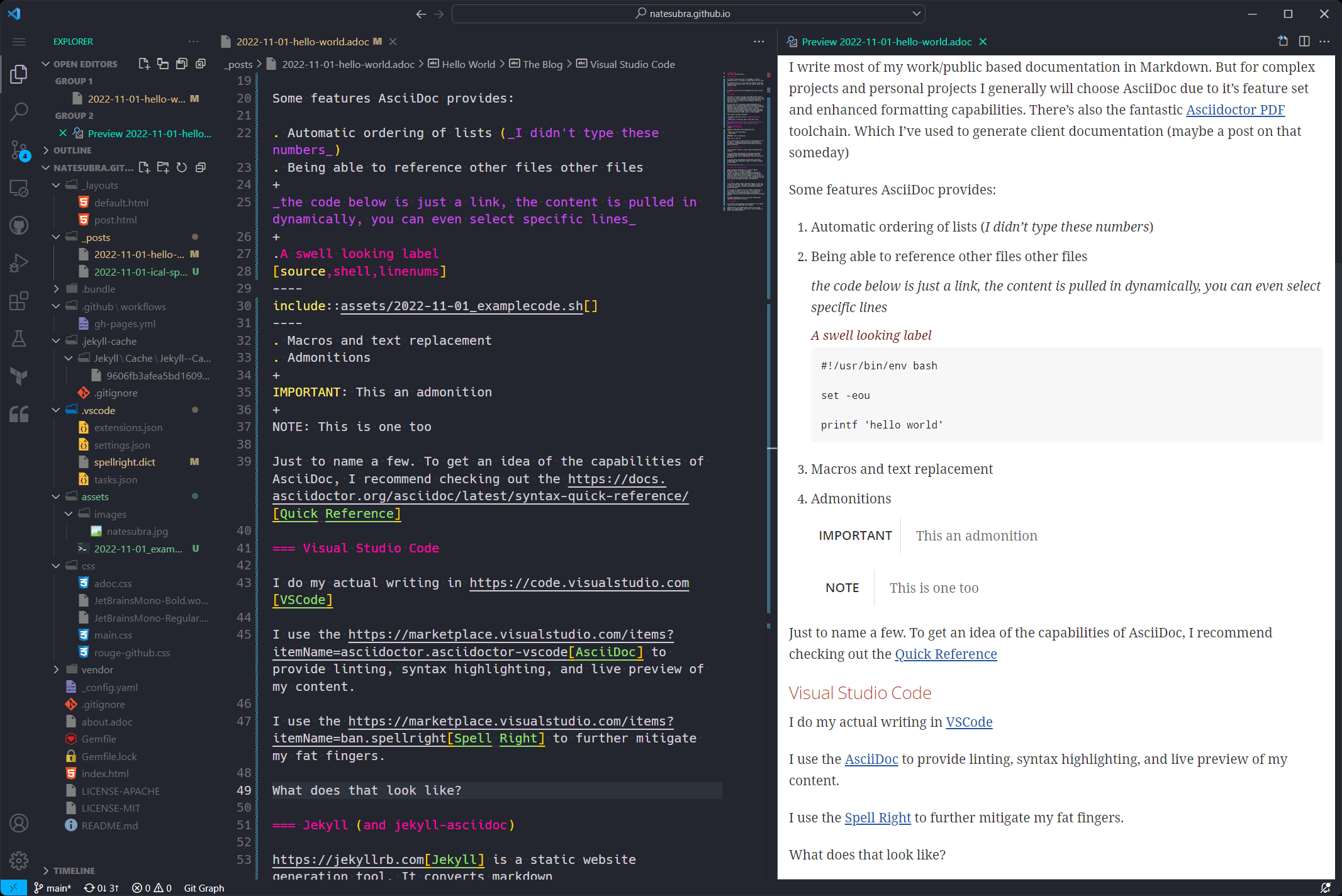
<p>I use the <a href="https://marketplace.visualstudio.com/items?itemName=asciidoctor.asciidoctor-vscode">AsciiDoc</a> to provide linting, syntax highlighting, and live preview of my content.</p>
</div>
<div class="paragraph">
<p>I use the <a href="https://marketplace.visualstudio.com/items?itemName=ban.spellright">Spell Right</a> to further mitigate my fat fingers.</p>
</div>
<div class="paragraph">
<p>What does that look like?</p>
</div>
<div class="paragraph">
<p>Something like this:</p>
</div>
<div id="vscode-setup" class="imageblock text-center">
<div class="content">
<a class="image" href="https://natesubra.com/assets/images/hello-world-vscode.png"><img src="/assets/images/hello-world-vscode_thumb.png" alt="My VSCode Setup"></a>
</div>
<div class="title">Figure 1. My VSCode Setup</div>
</div>
</div>
<div class="sect3">
<h4 id="jekyll-and-jekyll-asciidoc"><a class="anchor" href="#jekyll-and-jekyll-asciidoc"></a>Jekyll (and jekyll-asciidoc)</h4>
<div class="paragraph">
<p><a href="https://jekyllrb.com">Jekyll</a> is a static website generation tool. It converts markdown
to html to allow for simple and seamless creation of content. By adding the <a href="https://github.com/asciidoctor/jekyll-asciidoc">Jekyll AsciiDoc</a> plugin, I can write in AsciiDoc, and it renders it to HTML. Letting me have the power and flexibility of AsciiDoc, while simultaneously being able to use a well known and supported static site generator.</p>
</div>
</div>
<div class="sect3">
<h4 id="github"><a class="anchor" href="#github"></a>GitHub</h4>
<div class="paragraph">
<p>I use <a href="https://pages.github.com">GitHub Pages</a> to host the content of this site. The means the complete source code is available on <a href="https://github.com/natesubra/natesubra.github.io">GitHub</a>.</p>
</div>
<div class="paragraph">
<p><a href="https://github.com/features/actions">GitHub Actions</a> runs the build and saves the rendered content to the <code>gh-pages</code> branch.</p>
</div>
<div class="paragraph">
<p>You can browse the rendered content in the <code>gh-pages</code> branch <a href="https://github.com/natesubra/natesubra.github.io/tree/gh-pages">here</a>.</p>
</div>
<div class="paragraph">
<p>If you want to see what this post looked like before it was rendered to HTML, you can see it in AsciiDoc raw format <a href="https://raw.githubusercontent.com/natesubra/natesubra.github.io/main/_posts/2022-11-04-hello-world.adoc">here</a>.</p>
</div>
</div>
<div class="sect3">
<h4 id="cloudflare"><a class="anchor" href="#cloudflare"></a>CloudFlare</h4>
<div class="paragraph">
<p>I use <a href="https://www.cloudflare.com">CloudFlare</a> as my domain registrar and to manage DNS for my domain(s).</p>
</div>
<div class="paragraph">
<p>CloudFlare also provides CDN capabilities as well as terminate SSL.</p>
</div>
<div class="paragraph">
<p>Combining this with GitHub Pages allows me to use my domain as a landing page. This site is also available at <a href="https://natesubra.github.io" class="bare">https://natesubra.github.io</a> (which should redirect to <a href="https://natesubra.com" class="bare">https://natesubra.com</a>)</p>
</div>
</div>
</div>
</div>
</div>
<div class="sect1">
<h2 id="wrapping-things-up"><a class="anchor" href="#wrapping-things-up"></a>Wrapping things up</h2>
<div class="sectionbody">
<div class="paragraph">
<p>Thanks for reading if you&#8217;ve made it this far. I mostly write for myself but I hope others find it informative/entertaining.</p>
</div>
</div>
</div>]]></content><author><name>Nate Subra</name></author><summary type="html"><![CDATA[It&#8217;s ALIVE It&#8217;s been a long time since I&#8217;ve blogged or written anything publicly. I&#8217;m aiming to change that with this blog. My tentative plan is to talk about my thoughts around Red Teaming and the various information security fields I work in. I also plan to talk about some of the tech I work with and share my security research publicly when possible. The blog itself I figured I&#8217;d start with with talking about the technology this blog is built on. I&#8217;ve utilized many of the technologies for both personal and professional applications. AsciiDoc The posts are written in AsciiDoc. AsciiDoc is a markup language I found out about a few years ago while looking for a better way to generate technical documentation. I&#8217;d describe it as being more powerful that Markdown, but not as complex as LaTeX. It has a great OSS community Generally, I write most of my documentation in Markdown due to it being the defacto standard for many projects. It&#8217;s widely used and most technical folks are at least familiar with the name. For complex projects and personal projects I generally choose AsciiDoc for it&#8217;s feature set and enhanced formatting capabilities. It has a great toolchain, with libraries available for many languages (JS, Java, Ruby to name a few). It also has fantastic Asciidoctor PDF toolchain. Which I&#8217;ve used to generate client documentation and reports (maybe a post on that someday) Features Some of the features that AsciiDoc provides: Automatic ordering of lists (I didn&#8217;t type these numbers) Being able to reference/include other files with syntax highlighting The code below exists in my repo, but the content rendered here is inserted dynamically at generation. This allows me to reference code in my documentation, without requiring me to keep a copy in my post. 1 Unresolved directive in #excerpt - include::../assets/2022-11-01_examplecode.sh[] Macros and text replacement Admonitions This an admonition Rendering diagrams as code (Mermaid, Kroki, etc) Example Mermaid Diagram Failed to generate image: mmdc failed: Error: Could not find Chromium (rev. 1108766). This can occur if either 1. you did not perform an installation before running the script (e.g. `npm install`) or 2. your cache path is incorrectly configured (which is: /home/runner/.cache/puppeteer). For (2), check out our guide on configuring puppeteer at https://pptr.dev/guides/configuration. at ChromeLauncher.resolveExecutablePath (file:///usr/local/lib/node_modules/@mermaid-js/mermaid-cli/node_modules/puppeteer-core/lib/esm/puppeteer/node/ProductLauncher.js:263:27) at ChromeLauncher.executablePath (file:///usr/local/lib/node_modules/@mermaid-js/mermaid-cli/node_modules/puppeteer-core/lib/esm/puppeteer/node/ChromeLauncher.js:176:25) at ChromeLauncher.computeLaunchArguments (file:///usr/local/lib/node_modules/@mermaid-js/mermaid-cli/node_modules/puppeteer-core/lib/esm/puppeteer/node/ChromeLauncher.js:93:37) at async ChromeLauncher.launch (file:///usr/local/lib/node_modules/@mermaid-js/mermaid-cli/node_modules/puppeteer-core/lib/esm/puppeteer/node/ProductLauncher.js:57:28) at async run (file:///usr/local/lib/node_modules/@mermaid-js/mermaid-cli/src/index.js:404:19) at async cli (file:///usr/local/lib/node_modules/@mermaid-js/mermaid-cli/src/index.js:184:3) flowchart TD A[Deploy to production] --&gt; B(Where else would we deploy?); B -- True dat --&gt; C[DEPLOY ALL THE THINGS]; C ----&gt; E(???); E --&gt; F[Profit]; For additional details regarding AsciiDoc capabilities, I recommend peeking at the Quick Reference The Process Writing the content: Visual Studio Code I write my posts using VSCode I use the AsciiDoc to provide linting, syntax highlighting, and live preview of my content. I use the Spell Right to further mitigate my fat fingers. What does that look like? Something like this: Figure 1. My VSCode Setup Jekyll (and jekyll-asciidoc) Jekyll is a static website generation tool. It converts markdown to html to allow for simple and seamless creation of content. By adding the Jekyll AsciiDoc plugin, I can write in AsciiDoc, and it renders it to HTML. Letting me have the power and flexibility of AsciiDoc, while simultaneously being able to use a well known and supported static site generator. GitHub I use GitHub Pages to host the content of this site. The means the complete source code is available on GitHub. GitHub Actions runs the build and saves the rendered content to the gh-pages branch. You can browse the rendered content in the gh-pages branch here. If you want to see what this post looked like before it was rendered to HTML, you can see it in AsciiDoc raw format here. CloudFlare I use CloudFlare as my domain registrar and to manage DNS for my domain(s). CloudFlare also provides CDN capabilities as well as terminate SSL. Combining this with GitHub Pages allows me to use my domain as a landing page. This site is also available at https://natesubra.github.io (which should redirect to https://natesubra.com) Wrapping things up Thanks for reading if you&#8217;ve made it this far. I mostly write for myself but I hope others find it informative/entertaining.]]></summary></entry></feed>